Key System Design Metrics

When building large-scale distributed systems, engineers often make trade-offs between different system properties. Four of the most important metrics in design discussions are latency, throughput, availability, and consistency. Alongside these, the CAP theorem provides a framework for understanding the fundamental trade-offs every distributed system faces.
Latency
Latency refers to the delay or time lag between when a request is made and when a response is received. In networking terms, it's the time it takes for a packet of data to travel from its source to its destination, typically measured in milliseconds (ms).
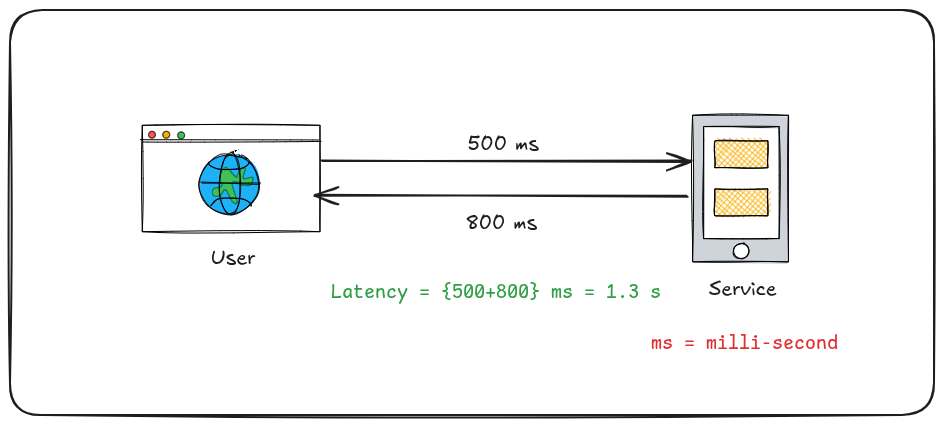
Lower latency means faster response times and a more responsive user experience. It's different from bandwidth, which refers to the amount of data that can be transferred in a given time period.
How to Reduce Latency
Reducing latency is crucial for improving user experience, especially for real-time applications. Some of the effective strategies in brief:
Use Content Delivery Networks (CDNs): Distribute content across multiple servers worldwide to serve users from the nearest location.
Implement Caching: Store frequently accessed data in temporary storage to avoid repeated requests to the origin server.
Optimize Network Infrastructure: Upgrade hardware, reduce network hops, and implement efficient routing.
Use Efficient Protocols: Implement HTTP/2, HTTP/3, or WebSockets for faster data transfer.
Code and Application Optimization: Minimize file sizes, optimize database queries, and use asynchronous processing.
Edge Computing: Process data closer to where it's needed rather than relying on centralized servers.
CDN vs Caching
While both CDNs and caching aim to reduce latency, they work differently:
CDN (Content Delivery Network)
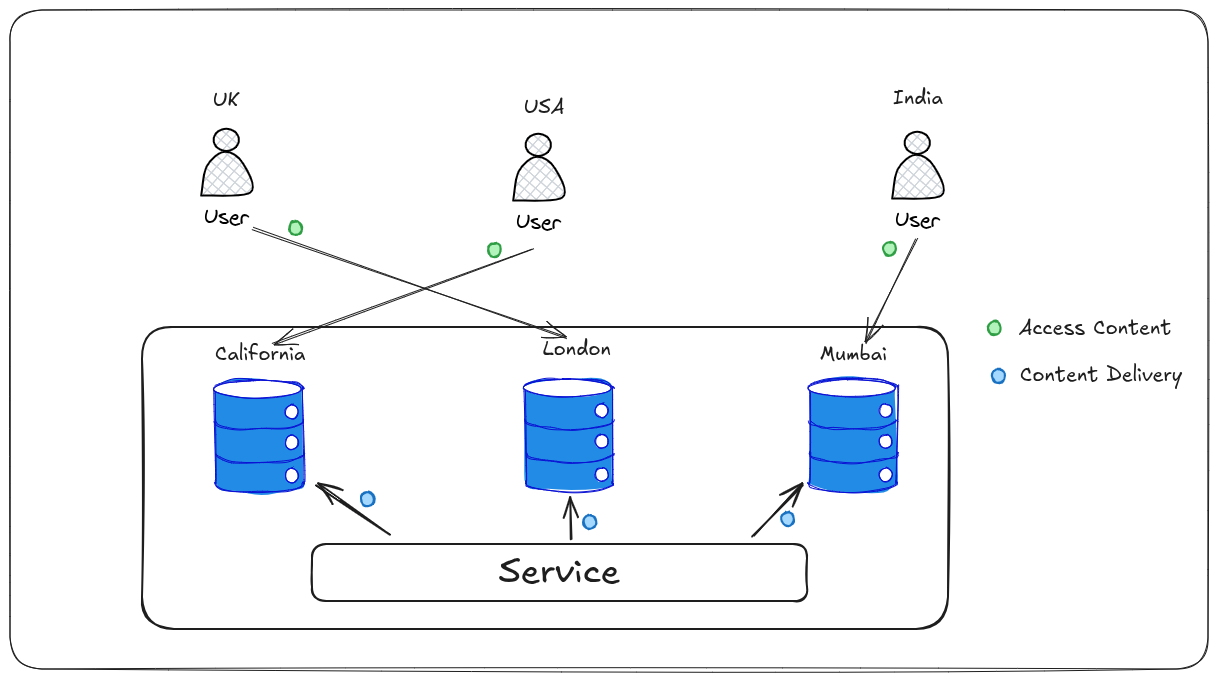
What it is: A geographically distributed network of servers that delivers content based on the user's location.
How it works: Replicates content across multiple servers worldwide and serves it from the nearest edge location to the user. Like Netflix and Amazon Prime distribute their movies in different parts of the world, like mumbai, california, london, etc. So when somone from India want to access the movie, the content is taken from Mumbai server their by reducing the latency to acquire the data from the close proximity.
Benefits:
Reduces physical distance data must travel
Handles high traffic loads efficiently
Provides redundancy and DDoS protection
Improves global content availability
Best for: Static content like images, videos, CSS, and JavaScript files
Caching
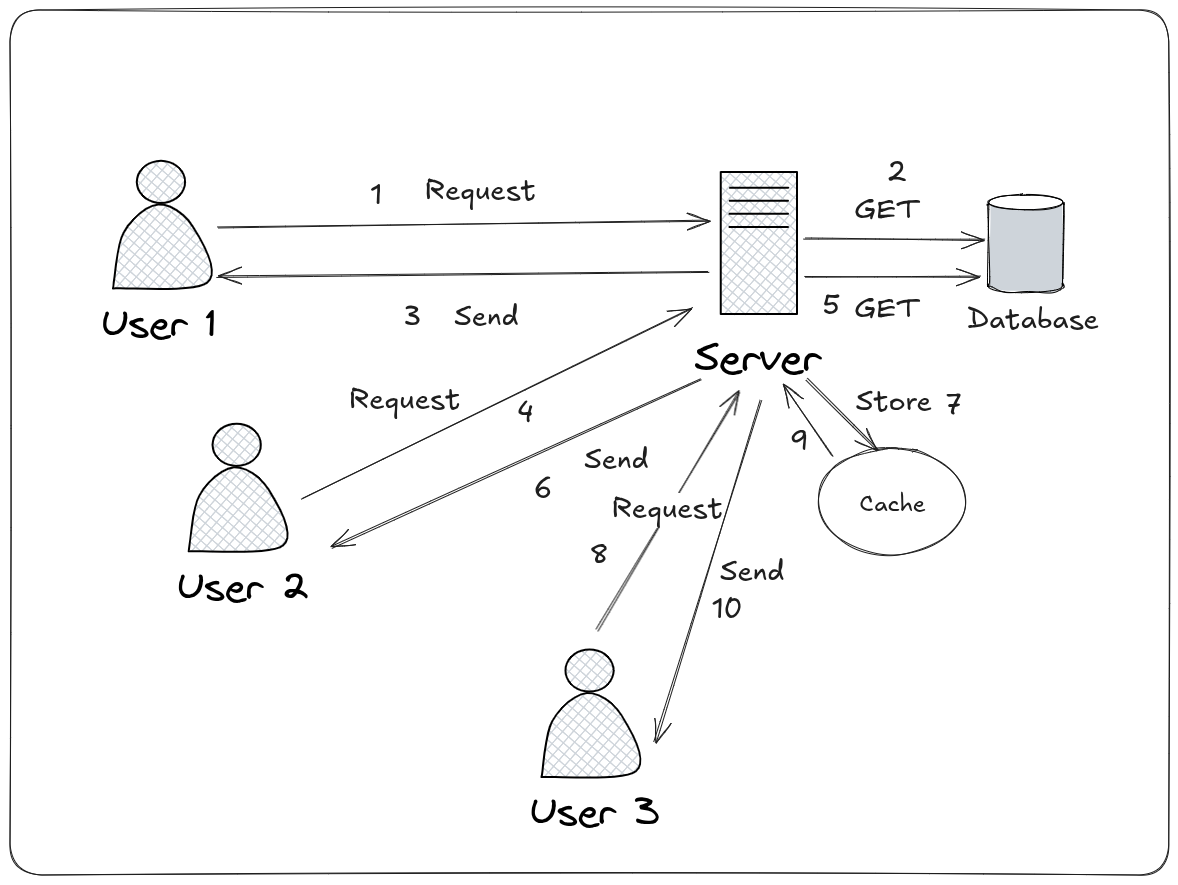
What it is: The process of storing copies of frequently accessed data in faster storage for quick retrieval.
How it works: Stores data in temporary storage (cache) so subsequent requests can be served faster without accessing the original source. This can be on users device or the server, the idea behind this is, with CDN we made the content delivery very fast. Using caching we were able to get the data faster, for example, the series squid game will be accessed a lot compared to other series, so storing these files in cache enables the server to send the required files faster reducing latency.
Types:
Browser caching (on user's device)
Server caching (on the server)
Database query caching
CDN caching (as part of CDN functionality)
Benefits:
Reduces processing time
Minimizes database load
Decreases bandwidth usage
Improves response times for repeated requests
Best for: Both static and dynamic content that's frequently accessed
Key Differences
Scope: CDNs focus on geographical distribution, while caching focuses on data storage and retrieval speed.
Implementation: CDNs are typically third-party services, while caching can be implemented within your own infrastructure.
Relationship: CDNs often use caching as part of their strategy to deliver content quickly from edge locations.
By combining both CDNs and caching strategies, organizations can significantly reduce latency and provide users with a faster, more responsive experience.
Throughput
Throughput refers to the actual amount of data successfully transferred over a network, processed by a system, or handled by a component within a specific time period. It's typically measured in units like:
Bits per second (bps), Kilobits per second (Kbps), Megabits per second (Mbps), Gigabits per second (Gbps)
Bytes per second (B/s), Kilobytes per second (KB/s), Megabytes per second (MB/s), Gigabytes per second (GB/s)
Requests per second (RPS) or Transactions per second (TPS) (for application/database performance).
Key Characteristics:
Volume Focus: It measures how much data or work gets done, not how fast a single piece moves (that's latency).
Effective Rate: It represents the actual useful data delivered, accounting for overhead (like protocol headers, retransmissions due to errors, or processing delays).
Resource Utilization: High throughput often indicates efficient use of available bandwidth, processing power, or storage I/O capacity.
Dependent on Multiple Factors: Throughput is constrained by the slowest component in the chain (the "bottleneck").
Throughput vs. Latency vs. Bandwidth:
Bandwidth: The theoretical maximum capacity of a channel (e.g., a 1 Gbps internet connection). It's the potential speed limit.
Latency: The time delay for a single piece of data to travel from source to destination (e.g., 50ms ping). It's the reaction time.
Throughput: The actual amount of data delivered per second over that channel, considering latency, errors, overhead, and other bottlenecks. It's the realized flow rate.
Analogy: Imagine a highway:
Bandwidth = Number of Lanes: How many cars can theoretically travel side-by-side.
Latency = Time for one car to drive from start to end: How long it takes for one car to complete the journey.
Throughput = Actual number of cars passing a point per hour: How many cars actually get through, considering traffic jams (bottlenecks), accidents (errors), toll booths (overhead), and the speed limit (bandwidth).
In more generic way, we can say throughput is the amount of useful data transferred over the network in a specific unit of time. A high throughput relate to a system where it consumed the maximum available bandwidth with lowest latency. A low throughput means the opposite of high.
How to Improve Throughput
Improving throughput requires identifying and eliminating bottlenecks across the entire path – network, server, application, and storage. Here are key strategies:
1. Increase Available Bandwidth (The Pipe Size)
Upgrade Network Links: Move from 100 Mbps to 1 Gbps, 10 Gbps, 40 Gbps, or higher for critical paths (internet connection, data center backbone, server NICs).
Use Link Aggregation (LAG/Port Channeling): Combine multiple physical network links into one logical channel to increase total available bandwidth and provide redundancy.
Upgrade Hardware: Use faster switches, routers, and network interface cards (NICs) that support higher speeds.
2. Optimize Network Configuration & Protocols
Reduce Latency: Lower latency indirectly improves throughput, especially for protocols like TCP.
Tune TCP Settings: Adjust TCP parameters like:
TCP Window Size: Increase the receive window (
net.core.rmem_max,net.ipv4.tcp_rmemon Linux) to allow more data "in flight" before needing an acknowledgment, crucial for high-latency/high-bandwidth links (Bandwidth-Delay Product).TCP Congestion Control: Use modern algorithms like BBR (Bottleneck Bandwidth and RTT) or CUBIC instead of older ones like Reno, which can be overly conservative on fast links.
Use Efficient Protocols:
HTTP/2 / HTTP/3: Enable multiplexing (sending multiple requests/responses simultaneously over one connection), header compression (HPACK), and server push, significantly improving web throughput.
QUIC (HTTP/3): Reduces connection setup latency and handles packet loss more efficiently than TCP over UDP.
UDP for Real-Time: For applications where low latency is critical and occasional packet loss is acceptable (e.g., video streaming, VoIP, online gaming), UDP avoids TCP's overhead and retransmission delays.
Enable Jumbo Frames: Increase the maximum transmission unit (MTU) size beyond the standard 1500 bytes (e.g., to 9000 bytes) on supported networks. This reduces the relative overhead of packet headers. (Requires end-to-end support).
3. Optimize Server & Application Performance
Scale Horizontally: Add more servers and use load balancing to distribute the workload, increasing overall system throughput.
Scale Vertically: Upgrade server hardware (more CPU cores, faster CPUs, more RAM, faster storage like SSDs/NVMe).
Optimize Application Code:
Reduce unnecessary computations and loops.
Use efficient algorithms and data structures.
Implement asynchronous processing and non-blocking I/O to handle more concurrent requests.
Optimize database queries (indexing, avoiding
SELECT *, efficient joins).
Leverage Caching: Aggressively cache frequently accessed data in memory (Redis, Memcached) or on disk (CDN caching, browser caching) to avoid expensive recomputation or database lookups, drastically improving throughput for repeated requests.
Use Content Delivery Networks (CDNs): Offload static content delivery (images, videos, CSS, JS) to globally distributed edge servers. This reduces load on your origin server and leverages the CDN's high-throughput infrastructure, improving global throughput for static assets.
Implement Compression: Compress data (e.g., Gzip, Brotli for HTTP text) before sending it over the network. This reduces the number of bytes that need to be transferred, effectively increasing throughput for compressible content.
Optimize Database Performance: Beyond query tuning, ensure proper indexing, connection pooling, database replication (read replicas), and consider sharding for very large datasets.
4. Optimize Storage I/O
Use Faster Storage: Replace HDDs with SSDs or NVMe drives for significantly higher I/O Operations Per Second (IOPS) and throughput. (In terms of system design, most designs might still refer storage as HDD, so point out this one.)
Implement RAID: Use RAID levels like RAID 0 (striping for performance) or RAID 10 (striping + mirroring for performance & redundancy) to aggregate storage throughput.
Optimize Filesystems: Choose filesystems optimized for your workload (e.g., XFS, ext4 for Linux; NTFS, ReFS for Windows) and tune their parameters.
Increase I/O Queue Depth: Allow more concurrent I/O operations to be queued to the storage subsystem.
5. Monitor, Measure, and Iterate
Identify Bottlenecks: Use monitoring tools (Prometheus, Grafana, Datadog, New Relic, Wireshark,
iperf,nload) to continuously measure throughput at different points (network interface, application, database) and pinpoint where the bottleneck lies (CPU, RAM, Disk I/O, Network I/O, specific application component).Load Testing: Simulate high traffic using tools like JMeter, Gatling, or k6 to understand your system's throughput limits under stress and identify breaking points.
Continuous Optimization: Performance tuning is an ongoing process. As traffic patterns change and new features are added, re-evaluate bottlenecks and apply optimizations.
Key Takeaway: Improving throughput is a holistic effort. It requires understanding the entire data path, identifying the weakest link (bottleneck), and applying targeted optimizations – whether that's upgrading hardware, tuning protocols, optimizing code, leveraging caching/CDNs, or scaling resources. Continuous monitoring is essential to guide these efforts.
Availability
Availability refers to the ability of a system, service, or component to be operational and accessible to users when they need it. It's a measure of reliability and uptime, typically expressed as a percentage over a specific period (e.g., per month or year). In cloud computing theory we always study that the cloud is available 99.999% of time.
Key Aspects:
Uptime Focus: It directly measures how long a system is functioning correctly versus how long it's down (downtime).
User Perspective: Ultimately, availability is about whether users can successfully access and use the service without interruption.
Measured in "Nines": High availability is often quantified using "nines":
99% ("Two Nines"): ~7.3 hours downtime/month (Acceptable for non-critical internal tools)
99.9% ("Three Nines"): ~43.2 minutes downtime/month (Good for many business applications)
99.99% ("Four Nines"): ~4.32 minutes downtime/month (Essential for critical business systems)
99.999% ("Five Nines"): ~26 seconds downtime/month (Required for life-critical, financial, or major infrastructure systems)
99.9999% ("Six Nines"): ~2.6 seconds downtime/month (Extreme high availability, e.g., telecom core)
Goal: Minimize planned downtime (maintenance) and unplanned downtime (failures, outages).
Why Availability Matters?
User Trust & Satisfaction: Frequent outages frustrate users and erode trust.
Business Continuity: Downtime directly translates to lost revenue, productivity, and potential reputational damage.
Competitive Advantage: High availability is often a key differentiator in competitive markets.
Compliance: Many industries have regulatory requirements for minimum availability levels.
Strategies for High Availability: Replication vs. Redundancy
Achieving high availability requires designing systems that can tolerate failures. Replication and Redundancy are two fundamental, complementary strategies, often used together.
Redundancy
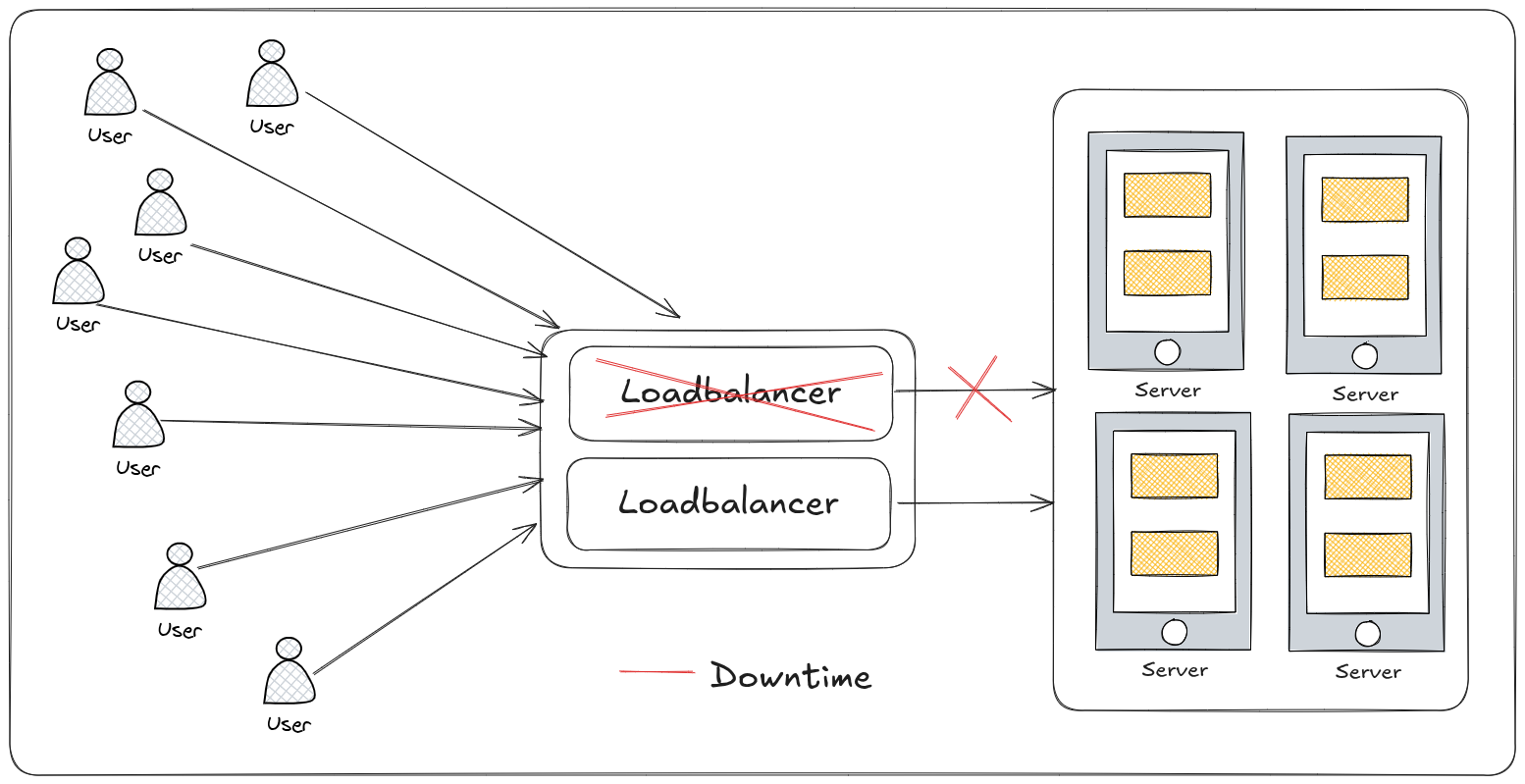
What it is: The practice of having duplicate components, systems, or paths that can take over if the primary one fails. It's about having spares.
Purpose: To eliminate Single Points of Failure (SPOFs). If one component fails, the redundant one seamlessly (or with minimal disruption) takes its place.
How it Works:
Active/Passive: One component handles the load ("Active"). The redundant component ("Passive") stands by, ready to take over if the active fails. Failover might cause a brief interruption.
Active/Active: Multiple components handle the load simultaneously. If one fails, the others absorb its traffic. This often provides higher performance and smoother failover.
Examples:
Hardware: Dual power supplies in a server, multiple network interface cards (NICs), spare disks in a RAID array (especially RAID 1, 5, 6, 10).
Network: Multiple internet connections from different providers, redundant switches/routers, redundant network paths.
Infrastructure: Multiple servers in a cluster, multiple data centers (geographic redundancy).
Power: Uninterruptible Power Supplies (UPS) + backup generators.
Key Benefit: Operational Continuity. Keeps the system running when a component fails.
Key Challenge: Cost & Complexity. Adding redundancy increases hardware, software, and management costs. Ensuring reliable failover detection and switchover adds complexity.
Replication
What it is: The process of creating and maintaining copies of data across multiple components, systems, or locations. It's about having copies.
Purpose: To ensure data durability, consistency, and accessibility even if the primary data store fails or becomes inaccessible. It protects against data loss and enables access from different locations.
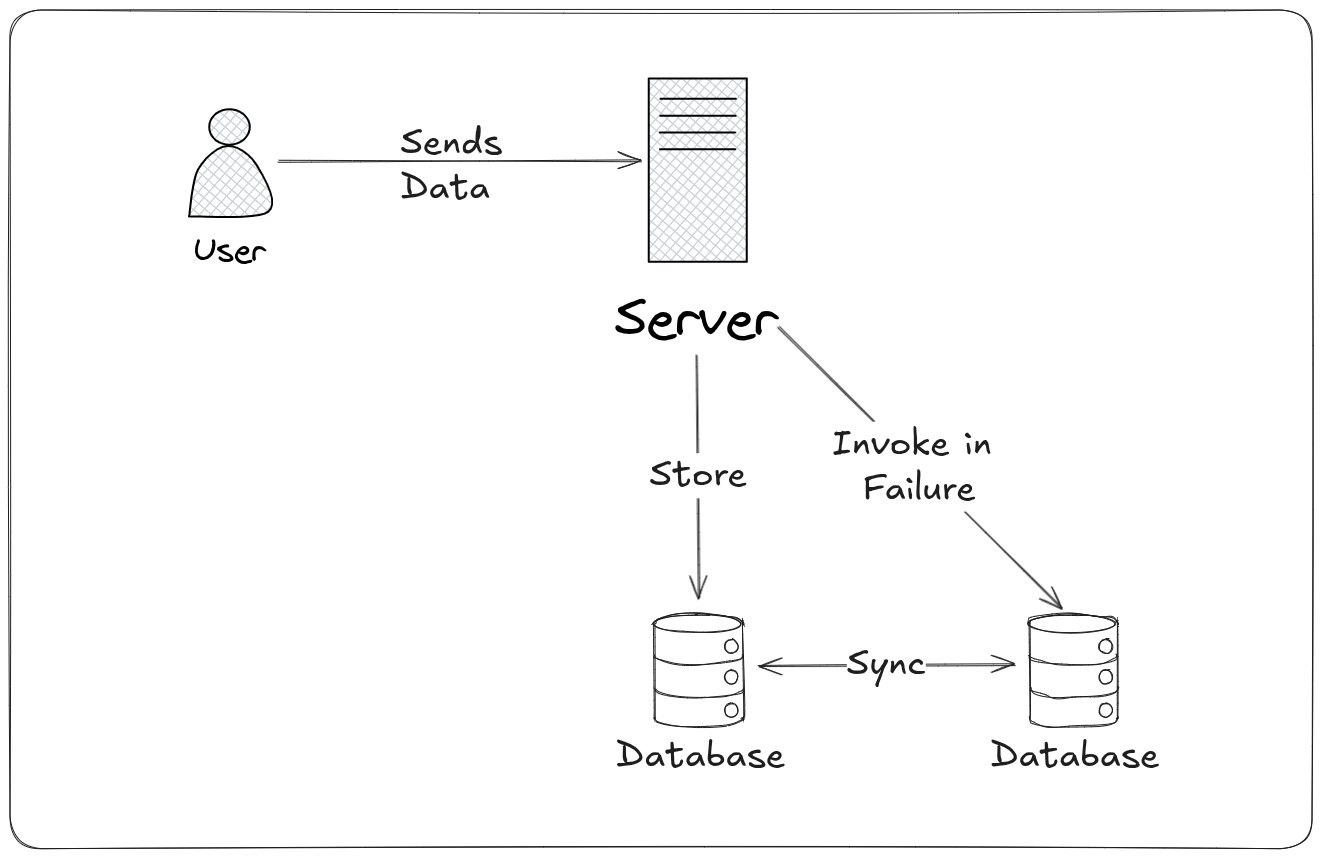
How it Works: Data written to a primary source is automatically copied ("replicated") to one or more secondary destinations. Replication can be:
Synchronous: Data is written to all replicas before acknowledging success to the client. Guarantees strong consistency but adds latency.
Asynchronous: Data is written to the primary first, acknowledged, then copied to replicas. Offers lower latency but risks losing recent writes if the primary fails before replication completes.
Examples:
Databases: Primary-Secondary replication (Master-Slave), Multi-Master replication, Database Clustering (e.g., Galera for MySQL).
Storage: RAID 1 (Mirroring), Storage Array Replication (e.g., SRDF, RecoverPoint), Distributed File Systems (e.g., HDFS, Ceph).
CDNs: Replicating static content globally.
Cloud Services: Replicating database instances across Availability Zones (AZs) or regions.
Key Benefit: Data Protection & Accessibility. Ensures data survives failures and can be accessed from multiple locations.
Key Challenge: Consistency & Complexity. Managing data consistency across replicas (especially asynchronous) is complex. Replication overhead consumes network bandwidth and system resources.
Replication vs. Redundancy: Key Differences & Synergy
| Feature | Redundancy | Replication |
| Core Focus | Components / Infrastructure (Spares) | Data (Copies) |
| Primary Goal | Operational Continuity (Keep system running) | Data Durability & Accessibility (Protect data, make it available) |
| Addresses | Hardware/Software Failures (SPOFs) | Data Loss, Data Unavailability |
| Mechanism | Duplicate components (servers, power, network) | Copying data (databases, storage, files) |
| Example | Dual power supplies, Multiple servers in a cluster | Database primary-secondary, RAID 1 mirroring |
| Failure Mode | Failover to spare component | Access data from a replica |
| Key Benefit | Minimizes downtime from component failures | Prevents data loss, enables geographic access |
| Key Challenge | Cost, Failover complexity | Data consistency, Replication overhead |
How They Work Together
Highly available systems combine redundancy and replication:
Redundant Infrastructure: You deploy multiple servers (redundancy) across different locations (e.g., data centers or cloud Availability Zones).
Replicated Data: You replicate your critical data (databases, files) across these redundant servers/locations (replication).
Load Balancing & Failover: A load balancer distributes traffic across the redundant servers (often in Active/Active mode). If one server or location fails:
The load balancer detects the failure (redundancy monitoring).
It stops sending traffic to the failed component (redundancy failover).
Traffic is redirected to the remaining healthy servers/locations.
Applications access data from the replicas on the healthy servers (replication accessibility).
Result: The system remains operational (thanks to redundancy), and users can still access their data (thanks to replication), achieving high availability.
Example (Cloud Database):
Redundancy: Database instances deployed across multiple servers in different Availability Zones (AZs).
Replication: Database data is synchronously or asynchronously replicated between the instances in different AZs.
High Availability: If the primary AZ fails, the database automatically fails over to a replica in another AZ (leveraging both the redundant infrastructure and the replicated data). Users experience minimal or no downtime.
Consistency
In distributed systems, consistency refers to the guarantee that every read operation receives the most recent write or an error. It defines the rules for how and when data becomes synchronized across multiple nodes (servers, replicas) in a system. Consistency models dictate what guarantees a system makes about the visibility of updates after a write operation.
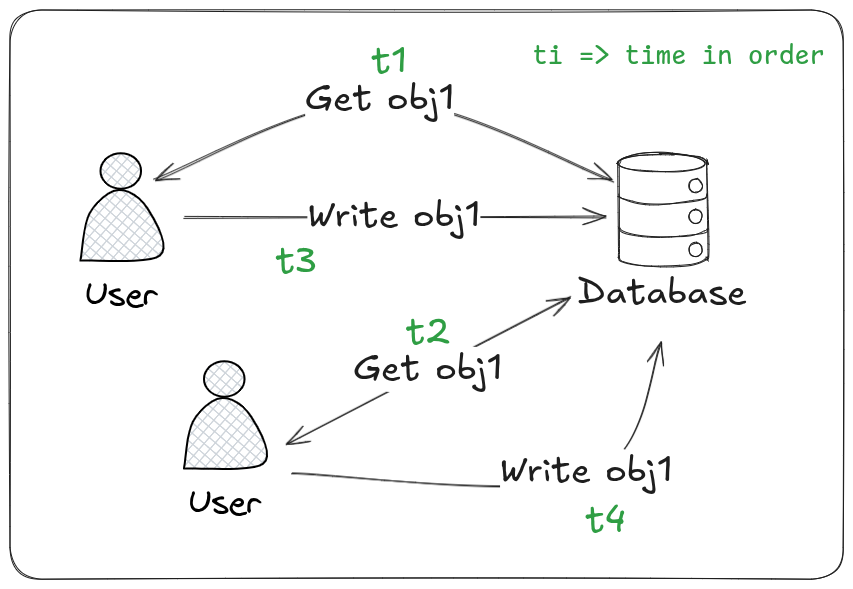
Here the problem is users are updating the same value before someone updates it. So the second user does update the value with the past value when the last user updated it with new value. Leading to an entire overwrite of incomplete or incorrrect value if that’s an operation.
Why Consistency Matters:
Correctness: Ensures users always see accurate, up-to-date data (e.g., your bank balance reflects the latest deposit).
Predictability: Applications can rely on data behaving according to the defined model.
Avoiding Conflicts: Prevents issues like overwriting changes unknowingly or seeing stale data.
CAP Theorem Trade-off: Consistency is one of the three pillars of the CAP theorem (Consistency, Availability, Partition Tolerance). Achieving strong consistency often requires sacrificing availability during network partitions.
Strong Consistency vs. Eventual Consistency
These are two fundamental, opposing ends of the consistency spectrum in distributed systems. Choosing between them involves significant trade-offs.
Strong Consistency
What it is: Guarantees that any read operation will always return the most recent write for a given piece of data. Once a write is acknowledged as successful, all subsequent reads (from any node) will see that write or a later one.
How it Works: Requires coordination between nodes before acknowledging a write. Common techniques:
Consensus Protocols: Paxos, Raft - nodes vote to agree on the order of operations.
Synchronous Replication: A write is only considered successful after it has been durably written to all (or a quorum of) replicas.
Distributed Locks/Mutexes: Prevent concurrent writes to the same data.
Primary-Backup with Synchronous Replication: Writes go to a primary, which synchronously replicates to backups before acknowledging.
Key Characteristics:
Linearizability: A specific, strict model of strong consistency where operations appear to execute instantaneously, atomically, and in some global order.
High Latency: Coordination overhead makes writes (and sometimes reads) slower.
Lower Availability: During network partitions (nodes can't communicate), the system may become unavailable for writes (or reads) to maintain consistency (CAP theorem).
Simplicity for Developers: Easier to reason about; data is always "correct".
Examples:
Traditional SQL databases (ACID transactions).
Systems like ZooKeeper, etcd (for coordination/locking).
Banking systems (critical for correctness).
Leaderboards where scores must be immediately accurate.
Best For: Applications where data accuracy and immediate visibility are paramount, and higher latency/occasional unavailability are acceptable trade-offs.
Eventual Consistency
What it is: Guarantees that if no new updates are made to a data item, eventually all accesses to that item will return the last updated value. There is no guarantee about when this will happen or what intermediate (stale) values might be read before convergence.
How it Works: Prioritizes availability and low latency. Writes are typically accepted locally and propagated asynchronously to other replicas in the background. Reads can be served from any replica, potentially returning stale data.
Key Characteristics:
High Availability: The system remains writable and readable even during network partitions (writes might be accepted locally).
Low Latency: Writes are fast (no waiting for remote replicas). Reads are fast (can use the closest replica).
Stale Reads Possible: Clients might read data that is not the absolute latest.
Conflict Resolution Required: Since writes can happen concurrently on different replicas before synchronization, conflicts can occur. The system needs mechanisms to resolve these (e.g., Last Write Wins (LWW), application-specific logic, CRDTs - Conflict-Free Replicated Data Types).
Complexity for Developers: Applications must be designed to tolerate temporary inconsistencies and handle potential conflicts.
Examples:
DNS (updates propagate globally, but not instantly).
Amazon DynamoDB (default), Apache Cassandra, Riak.
Content Delivery Networks (CDNs) - content updates take time to propagate globally.
Social media "likes" or "shares" counts (might not update instantly everywhere).
Shopping cart contents (temporary inconsistencies are usually acceptable).
Best For: Applications where high availability, scalability, and low latency are critical, and temporary inconsistencies are acceptable. Ideal for globally distributed systems.
Strong vs. Eventual Consistency: Key Differences
| Feature | Strong Consistency | Eventual Consistency |
| Read Guarantee | Always returns the latest write (or error). | Eventually returns the latest write (if no new writes). May return stale data temporarily. |
| Write Latency | Higher (requires coordination/replication). | Lower (often local ack, async replication). |
| Availability | Lower during partitions (CAP trade-off). | Higher during partitions (remains operational). |
| Stale Reads | Never (by definition). | Possible (core characteristic). |
| Conflict Handling | Prevented (coordination enforces order). | Required (concurrent writes cause conflicts). |
| Developer Model | Simpler (data is always "correct"). | More Complex (must handle inconsistencies/conflicts). |
| Scalability | Harder (coordination limits scale). | Easier (local operations, async sync). |
| Primary Goal | Data Correctness & Predictability. | High Availability & Low Latency. |
| CAP Theorem | Prioritizes Consistency over Availability during Partition. | Prioritizes Availability over Consistency during Partition. |
| Example Systems | ZooKeeper, etcd, traditional ACID DBs. | DynamoDB, Cassandra, Riak, DNS, CDNs. |
Beyond the Extremes: Other Consistency Models
Real-world systems often use models between strong and eventual:
Weak Consistency: A step above eventual. The system does not guarantee that subsequent accesses will return the updated value. There are no guarantees on when consistency will be achieved, only that it will happen eventually. Accesses to the same storage location might be required to be sequenced.
Causal Consistency: A popular middle ground. Guarantees that causally related operations (writes that depend on previous reads/writes) are seen by all nodes in the same order. Concurrent (causally unrelated) operations might be seen in different orders. Provides more guarantees than eventual but less than strong, with better performance than strong.
Read Your Writes (RYW): A client will always see its own writes. Other clients might not see them immediately.
Session Consistency: Guarantees RYW within a single session (e.g., a user's login session). Operations outside the session have no guarantees.
Bounded Staleness: Guarantees that reads will return data that is at most
Kseconds old, or no more thanNversions stale. Provides a measurable limit on inconsistency.
Choosing the Right Model:
Need absolute correctness? (Banking, inventory) → Strong Consistency.
Need massive scale, global reach, high availability, and can tolerate temporary delays? (Social feeds, user profiles, shopping carts) → Eventual Consistency (or Causal/Bounded Staleness).
Need a balance? (Many collaborative apps, messaging) → Causal Consistency or Session Consistency.
Understanding the consistency model of your database or distributed system is crucial for building correct, reliable, and performant applications. There is no single "best" model – the choice depends entirely on your application's specific requirements and tolerance for trade-offs.
CAP Theorem
The CAP Theorem, also known as Brewer's Theorem, is a fundamental principle in distributed systems design. It states that a distributed computer system can only guarantee at most two out of three of the following properties simultaneously:
Consistency (C)
Availability (A)
Partition Tolerance (P)
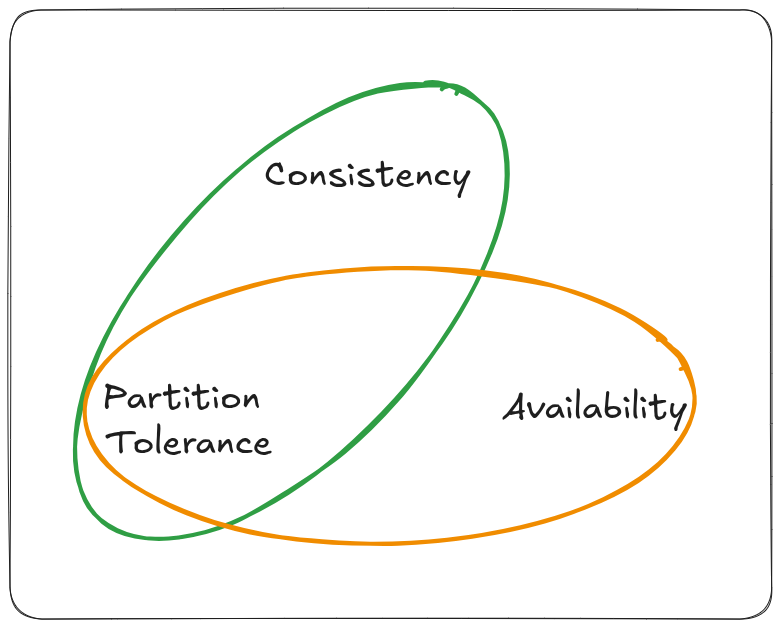
In simpler terms: You cannot simultaneously have perfect consistency, perfect availability, and perfect partition tolerance in a distributed system. You must make a trade-off.
Understanding the Three Properties
Consistency (C)
Definition: Every read receives the most recent write or an error. All nodes in the system see the same data at the same time. (This aligns with Strong Consistency as discussed earlier).
Goal: Data correctness and predictability across the entire system.
Example: After you update your bank balance, every subsequent query (from any branch or ATM) must immediately reflect that new balance.
Availability (A)
Definition: Every request receives a (non-error) response, without the guarantee that it contains the most recent write. The system remains operational and accessible.
Goal: The system is always "up" and responsive to user requests, even if some nodes fail.
Example: You can always access your online shopping cart, even if parts of the system are down. You might see a slightly outdated item count temporarily.
Partition Tolerance (P)
Definition: The system continues to operate despite an arbitrary number of messages being dropped (or delayed) by the network between nodes (a "network partition"). Nodes are split into groups that cannot communicate with each other.
Goal: Resilience against network failures, which are inevitable in real-world distributed systems (especially across data centers or the cloud).
Example: A network outage cuts communication between servers in the US and Europe. The system must decide how to handle requests in both isolated regions.
The CAP Trade-Off: Why You Can't Have All Three
The core conflict arises during a network partition (P). When nodes cannot communicate:
To Guarantee Consistency (C): The system must stop processing requests that could lead to inconsistency. If a node can't verify it has the latest data (because it's partitioned away from other nodes), it must either return an error or wait until the partition heals. This sacrifices Availability (A). (System becomes CP).
To Guarantee Availability (A): The system must continue processing requests on all nodes, even if they are partitioned. A node might serve stale data (not the latest write) or accept writes that conflict with writes happening in other partitions. This sacrifices Consistency (C). (System becomes AP).
Partition Tolerance (P) is NOT Optional: In any real-world distributed system (multiple nodes communicating over a network), network partitions will happen. Therefore, P is a mandatory requirement. The true trade-off exposed by CAP is between Consistency (C) and Availability (A) in the presence of a network partition.
CAP is often misunderstood as "Pick 2 out of 3". A more accurate interpretation is:
"During a network partition (P), a distributed system must choose between Consistency (C) and Availability (A)."
The Two Choices: CP vs. AP Systems
1. CP Systems (Consistency + Partition Tolerance)
Prioritizes: Data correctness above all else.
Behavior During Partition: Sacrifices availability. Nodes that cannot communicate with the majority/quorum needed to maintain consistency will either:
Return errors for read/write requests.
Stop serving requests entirely (become unavailable).
Wait until the partition heals before responding.
Goal: Prevent stale reads or conflicting writes at all costs.
Examples:
Traditional RDBMS with Synchronous Replication: (e.g., PostgreSQL in synchronous mode, Oracle RAC). A partition might cause the database to become read-only or reject writes until consistency is restored.
ZooKeeper / etcd: Used for distributed coordination/locking. They require strong consistency to work correctly (e.g., ensuring only one leader exists). They sacrifice availability during partitions.
HBase: Prioritizes strong consistency for data access.
Use Cases: Banking systems, inventory management, critical control systems, distributed locking services – where data must be accurate.
2. AP Systems (Availability + Partition Tolerance)
Prioritizes: Keeping the system operational and responsive.
Behavior During Partition: Sacrifices strong consistency. Nodes continue to accept reads and writes, even if partitioned.
Reads might return stale data (from the local replica).
Writes accepted in different partitions might conflict. These conflicts need to be resolved later when the partition heals (using mechanisms like Last Write Wins, CRDTs, or application logic).
Goal: Ensure users can always interact with the system, even if the data isn't perfectly up-to-date everywhere.
Examples:
Amazon DynamoDB / Apache Cassandra / Riak: Designed for high availability and scalability. They use eventual consistency models. During a partition, writes continue locally and are reconciled later.
DNS: Updates propagate eventually; the system remains available even if some root servers are unreachable.
Content Delivery Networks (CDNs): Content updates take time to propagate globally; users always get a response (often cached/stale).
Many NoSQL Databases: Built with availability and partition tolerance as primary goals.
Use Cases: Social media feeds, user profiles, shopping carts, content management, IoT data collection – where temporary inconsistencies are acceptable, but downtime is not.
Important Nuances & Misconceptions
"AP means Inconsistent": This is a common misconception. AP systems are consistent – eventually. They prioritize availability during a partition and resolve inconsistencies after the partition heals. They don't abandon consistency entirely; they relax its immediacy.
The "PACELC" Extension: CAP only defines behavior during a partition (P). The PACELC theorem extends it:
PArtition tolerance: If a Partition occurs, how do you trade off between Availability and Consistency? (This is CAP).
ELse: Else (when the system is running normally in the absence of partitions), how do you trade off between Latency and Consistency?
Example: A CP system (chooses C over A during P) might still offer tunable consistency levels (e.g., read quorums) to reduce latency in normal operation (choosing L over C in EL).
Not Binary Choices in Practice: Many systems offer tunable consistency. You can often configure the level of consistency per operation or per data type, allowing you to make finer-grained trade-offs within the CP/AP spectrum. (e.g., Cassandra allows
QUORUM,ONE,ALLconsistency levels for reads/writes).Consistency Models Matter: "Consistency" in CAP specifically refers to Strong Consistency (Linearizability). Systems choosing AP typically use weaker models like Eventual Consistency, Causal Consistency, or Session Consistency.
Single Node Systems: CAP applies only to distributed systems. A single-node database (e.g., standalone MySQL) trivially provides both C and A (no network to partition!), but it lacks partition tolerance and scalability.
Why CAP Theorem Matters
Design Foundation: It forces architects to explicitly define the primary goal of their distributed system: Is data correctness non-negotiable (CP)? Or is staying always responsive paramount (AP)?
Managing Expectations: It clarifies the inherent limitations and trade-offs. You cannot build a system that is instantly, perfectly consistent and always available and perfectly resilient to any network failure.
Technology Selection: Understanding CAP helps choose the right database or technology stack. Need strong consistency? Look at CP systems (ZooKeeper, etcd, ACID DBs). Need high availability at scale? Look at AP systems (DynamoDB, Cassandra, Riak).
Problem Diagnosis: When a system behaves unexpectedly during an outage (e.g., becoming unavailable or serving stale data), CAP provides the context for why that happened based on its design choice.
In Summary: The CAP Theorem highlights the fundamental tension in distributed systems. While network partitions (P) are unavoidable, you must choose between prioritizing Consistency (C) (data accuracy, risking unavailability) or Availability (A) (system responsiveness, risking temporary inconsistency) when those partitions occur. Understanding this trade-off is crucial for designing robust, scalable, and fit-for-purpose distributed systems.